Here’s an extended trailer for Race of the Zodiac!
Archive for the ‘MGS’ Category
A few weeks ago we had a feedback session on our game’s current state and we’ve laid out some plans on the feedback received. Some of the session notes are below and I’ll include our responses to them and plan of action.
A child will have difficulty processing the information in the game quick enough to correctly play it (due in large part to the automation of the running). It’s a complicated thought process to have to switch to a different animal and then jump or steer away from an obstacle or collect coins- especially for children who will have a hard time even remembering what they should do.
Our response to this is that in all of our playtesting with kids, we haven’t seen this issue. When difficulty arises in switching the poses, it is when the poses themselves are difficult, like our old cat pose.
-I have no idea how this game is about the Chinese Zodiac- it could be called “Zoo Breakout” or “Animal Team Mountain Racing”. The game is too generic and hasn’t embraced the theme.
-UNEXPECTED MOMENTS OF DELIGHT should be plentiful in a game for children.
-Reaching the finish line should feel much more rewarding than it does.
-The changing of the animal should feel like it’s magic…(vfx, sounds,etc.) Children will totally accept it (the fact that they are a tiger and then a bunny and then a ram) without being confused if it feels like magic.
We are addressing this by the inclusion of more art assets, such as story pages for the zodiac animals, 2D billboards with animals for the bushes, and an enhanced UI that gives more Zodiac tones. At the finish line, there will be fireworks, extra characters, etc. to give it more of a celebratory feel.
The majority of time in a Kinnect game should involve movement… it seems like there was a lot of “standing around” in this game.
Last semester, I had a LOT of obstacles and collectibles for players. However, I received feedback that there should be less in the game so that players have more time to catch their breath. It’s funny how these things go back and forth. When playtesting the other day with an EAE visitor, I noticed indeed that they stand around a lot. This means that I need to add more obstacles and collectibles to the level in order to find the perfect balance of movement and rest for players. I think I may go ahead and place collectibles immediately after turns to challenge players. I’ll jokingly refer to this game for hardcore players now with all the jumps and scrambling they’ll have to do.
-TIP: I think it would be great to automatically record the child playing the game and show it at the end of the game so the child can look at themselves playing and laugh about it.
We looked at this feature, and as much as we’d like to include it, we couldn’t get it in last semester and due to the fact that we don’t have any engineers on a regular basis anymore this is something we’ll just have to forgo in this build. 😥
There was a lot of other feedback, but these were some of the ones that we felt we could address quickly or found to be out of reach and quickly nixed. In addition, below are our priorities.
Need to Do:
1) Attach the particle prefabs to the characters
– Speed Lines
– Breakaway effects (logs, rocks)
2) Zodiac Animal Profiles – “Moving Cards” system
– 13 Cards (Original twelve and the cat)
3) Messaging for the player to perform ideal poses in sections (On UI)
– Decided the popping it up for the player would be more helpful.
4) “Fake” Tracks to “trick” the player – Waterfalls, caves, etc.
5) Pop-Up characters during the race.
6) Coins Float to UI Coin Element
7) Export Unity Scene to Maya (If possible)
These are features that we can implement with little or no engineering needed, or at least we hope so. Our UI issues will hopefully be solved by floating plane images of the animals that are “recommended” for the current section. In regards to “faking” track features to “trick” the player, we have those art assets available (bushes, waterfalls), that we can place on the track to add unexpected moments of delights for the player.
I’d really love to see Zodiac go mobile. Hypothetically, we have the pieces to turn it into a distance runner – the track left, right, fork, and straight pieces could be each textured with multiple “terrains” to give them variety. However, before we attempt Zodiac as a distance runner, we could look taking our current game and porting it into a mobile experience. Since the game runs on rails and there are automatic turns, we could have players tilt the device left and right to move their character in the appropriate directions. Or, we could take out the automatic turns and implement the swiping feature prevalent in many distance runners currently that requires the players to swipe in the direction of the turn they want to go. Additionally, animals could be chosen by tapping on an icon on the side of the gameplay screen, and jump could be a button as well. Or perhaps it should be a swipe to jump up as in other distance games like Pitfall and Temple Run. I feel that turning Zodiac into a free mobile experience could give us far more exposure than a limited release on Desura for the very small amount of people who use Kinect on Windows. However, we face a variety of challenges in looking to turn this game mobile.
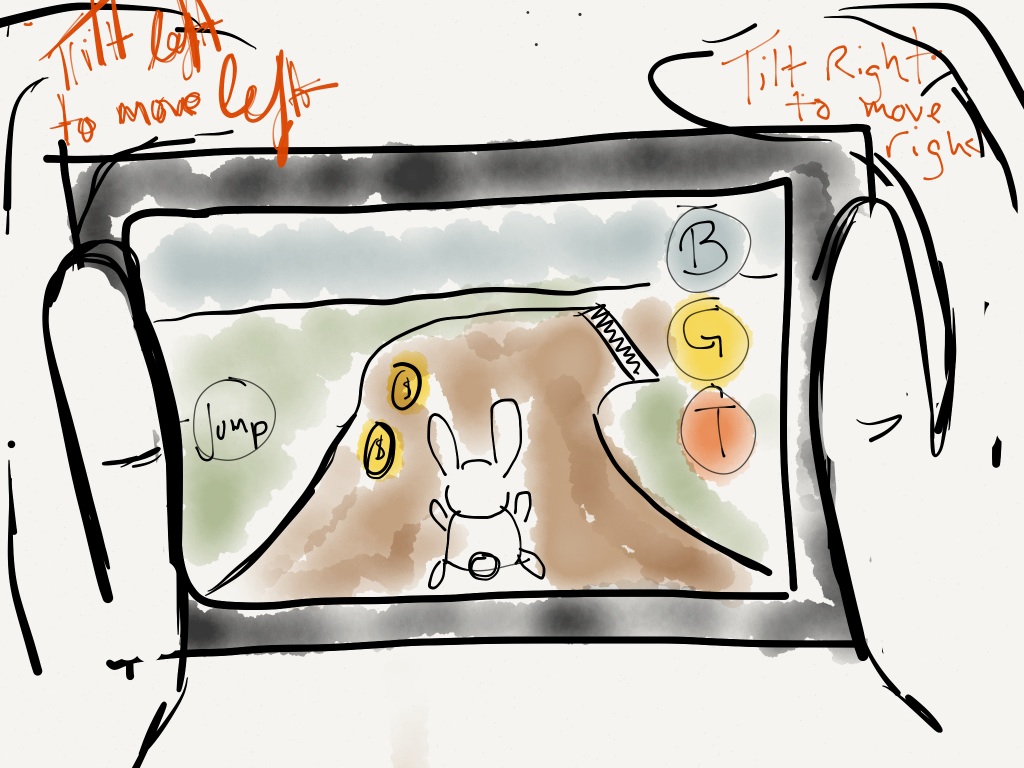
A mockup of what Zodiac could look like on a mobile system.
Currently, our polycount is at around 500K triangles. One of the drawbacks on developing on such high end machines is that we didn’t sit out at the beginning of the development process and think about what types of PCs we’re developing for. As our game stands right now, only high end PCs can handle it. Oversight definitely had a part in that, but we also found out that Unity’s environmental terrain builder puts out an incredibly high poly-rate. Thus, what we need to do is extract the terrain out of Unity and import it into Maya. Ashley will be culling down the poly-count for the terrain and we hope to place it back into Unity to get the polycount down to 10K. That will be a huge undertaking, and frankly, I’m unsure about the outcome of this endeavor. However, even if we can’t cull it down to iOS or Android standards, the lower polycount will allow it to run on more PCs. We also need some engineering brains to think about how we can optimize our draw distance and occlusion rates to see if that will help enhance game performance for other machines.
It is daunting to have such high hopes for the game as this program draws to a close and still have so much work left over. Our lack of engineers this semester due to (awesome!) internships leave us with not a lot of options in regards to the programming for the game. It’ll be interesting to see where this goes. I have suggested to our EP, Roger, that we need engineers if we are to get any of the heavy work done this semester, so I hope it all comes into place that we can attempt a beta version of a mobile version of the game. I sense a lack of a commitment from people about attempting a mobile version this semester, which is disheartening. I won’t be holding my breath, but it’ll be interesting to see where the game goes.
It’s the beginning of the final semester, so that means publication of Zodiac and an internship as well. Busy!
Here are the final things that I’m in charge of for the publication of Zodiac:
-Final placement of level obstacles and collectibles. Currently, all of these are placed, but due to perception issues when placing within Unity, some coins are higher than others or halfway into the ground. The same goes for the rocks and logs. I think the best way to tackle this is to take it a small section bit by bit rather than go for the whole map at once, which can be overwhelming and unbearable in approach.
-Pose GUI- This is more in the hands of the artist and engineering side right now, but we definitely need a GUI that informs the player what poses to do. It could be a singular GUI, but I like the idea of a GUI for each animal that appears when the player is doing the correct pose.
-Publication: I’m hoping that after we finish the game for Kinect and publish it to Desura that we can think about redesigning the game for mobile and maybe pushing it out to China on Android and iOS. Currently, our biggest challenge is the fact that our poly count right now is 500K! The max that an iOS product can typically handles is maybe 15K. We definitely have some cutting to do. Redesigning the level for a low poly count is both a challenge for the engineers and artist and could drastically alter the amount of work for a mobile version of the game. In addition to the art, we are thinking about how it would look as an endless runner on mobile, and that poses another challenge for engineering. I think our engineers could do it, and I would love to have the opportunity to design an endless runner.
Those are three things that are on my mind for the game this final semester, along with my thesis paper and internship, which leads me into the next section.
Charlie, Troy, Christine, and Wong (Cohort 3) are working in conjunction with Roger on a game for the Leonardo museum. It has been a whirlwind of a process. We’ve been chatting about the project for about three weeks now and each time it seems to transform.
At first we discussed ownership and copyright law of the 1970s. When we look at ownership today, the copyright laws of days gone by don’t work in our rapidly changing digital landscape. So how do we create a piece about such an issue? At first we took the notion of a virtual pet petting zoo in which players could go to the museum, take the animals onto their digital devices and choose to keep or distribute them to other players. While we had a lot of ideas on things that could be fun, we didn’t have much of a game. In the next meetings, we discussed a race game with infographics where players could take the avatars to their devices and place them back in the game, but we couldn’t find a compelling reason or pros/cons for the players to participate in this game. This led us to thinking about a match 3 game where players could play it in the museum, but then players with smart phones could play the same game on their device and have an advantage by seeing hidden information that the museum player can’t see. A fun game design indeed, but it still didn’t smell quite right.
In our most recent meetings we’ve talked about another idea that seems to be a step in a more definite direction. We’ve foregone the idea of copyright and ownership and have approached the idea instead of emergent gameplay. Back in the 1970s, the Magnavox Odyssey had players place static cling overlays on their televisions to play the system’s games – which were pretty much electronic boardgames. In good faith, players moved their onscreen pixels along a race track in a race game, or they might have placed the pixel on the appropriate dinosaur in a match game. Roger felt that these types of technology allow for emergent gameplay – that is, what if we took these overlays and juxtaposed them with another game like pong. Below is a picture of what that might look like.

So, I think we’re on the right track because now our game idea looks more like an art game, but I think the game bit is still very nebulous. Do we create digital overlays and program rules for them that players can choose to turn on or off and see how they affect the play area? Or do we use physical ones and let players wreck havoc with them as they see fit? I don’t know if we’ll nail down the game idea this week, but I think it will come together in the next few weeks.
This is the final area of the level. The player is back in the grasslands of the level, and they are then taken through a village area. The final moments of the game’s level finds them running up the steps of a mountain to the Jade Palace and to victory. This final area offers long straight paths that focus on obstacle dodging and coin collecting. The player activity is kept at a strong pace, but once they arrive in the city, it tapers down and the player can peacefully enjoy their ascent to the Palace. I wanted to make sure that the player was still challenged, but that the level rewards them at the end for their journey. Thematically, I feel that this level crescendos at various moments, but has the biggest crescendo at the end when they rise up the path to the Jade Palace. The final moment in the level is a nice bookend for their experience.
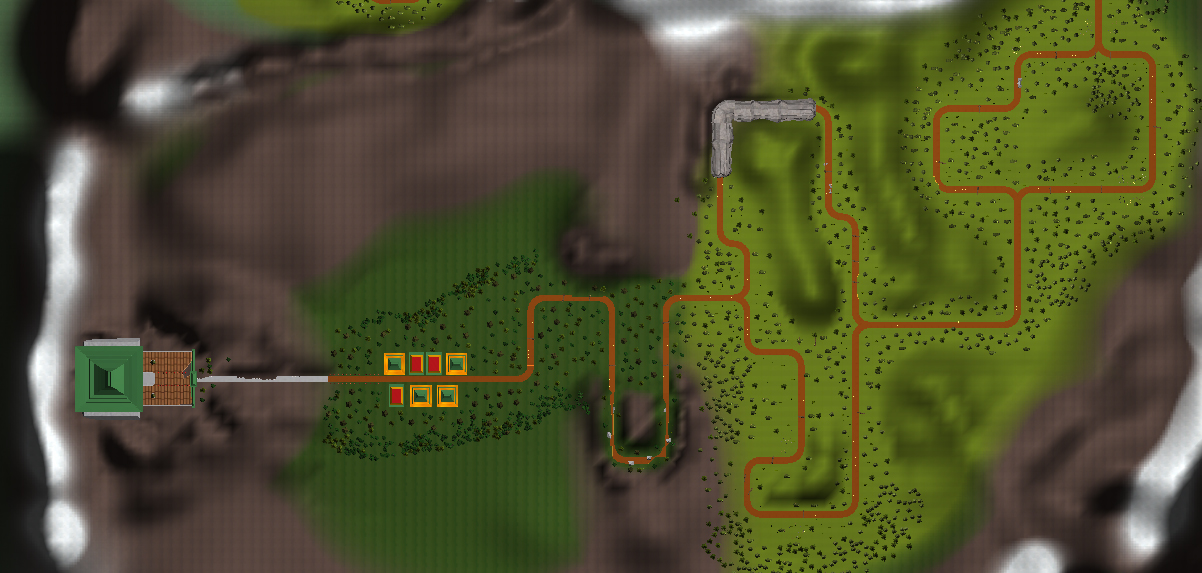
Final are of the level
This is the second major area of the level. As you can see it’s a snow area that definitely changes the feel of the game from the previous area. There are more caves in this section so that the player can experience them, even if they missed the first cave in the previous valley. There are drop offs to the side of the play area to give the player a sense of scale. One of my favorite areas on this map is the final cave. The player goes into a dark snowy cave and as they emerge, they find themselves in the grasslands. I’ve been told by players that this is one of their favorite moments because the strong dynamic change is handled well by the transition through the cave.
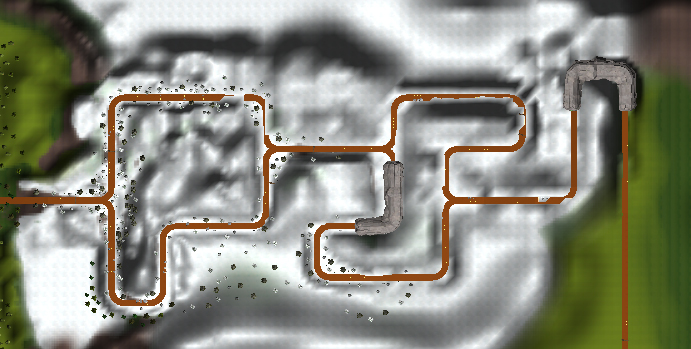
Middle area of the level.
For the next few posts, I’ll be focusing on the portions of the level as they were translated from paper to digital form. This is the final playable level that you could play at EAE Open House and it is on the Unity server.
In the beginning of the level, I wanted to create the feeling that you were beginning your adventure. After a few turns you rise up out of the canyons into a valley that is very spacious and populated with trees and flowers. There’s an ideal path to the right at the first fork, which will take your character through the level much faster by about 15 seconds. The other path, with its twists and turns and its cave, proves a much longer journey for the player. The valley gives the player a sense of openness and I like the dynamic it gives them during the first minute or two of the experience.

Beginning Area of the level
The EAE Open House was definitely a success. People really enjoyed our game and we got great feedback. Even though our game is targeted towards kids, their parents enjoyed playing it as well. It was fun to see kids play the game, especially the hyperactive ones, and I saw that their parents enjoyed watching them play it as well too. Overall, our goal was for people to have fun, and they definitely did.
Some feedback that we got was that we should make a GUI that informs the player how to do the poses – we’ve been talking awhile about implementing some sort of messaging system, but it’s definitely been put on the backburner. Now that the public is suggesting it and that we have more time, we can hopefully get this into the game next semester. Currently, we have the Kinect’s default GUI that shows a body made of floating balls that indicate the hands, joints, head, etc. It makes sense to us as adults, but it could possibly be beyond the grasp of younger kids. This is definitely something important for us to get in before we publish the game.
We were working on this level up until the midnight hour. The engineers were finally able to place the tracks down and get the game running without any disasters. After that it was up to me to place all the obstacles and collectibles, which took quite awhile. Finally, Ashley and Brandon placed all the art assets of trees and such within the level, along with the caves and grass to create the rabbit and tiger areas. One of the reasons that it took awhile is that Unity only allows one person to work within a scene. That means that Anurag can program the track tool in another scene, Pace can work on occlusion in one scene, and I can edit the game level in another scene, but we can’t work on the same scene at the same time. Thus, this creates a lot of dependency for when the artist wants to tweak and modify the environmental art. This unfortunate situation makes for a lot of sitting around for the team sometimes.
We overcame all of that though and made a level that was ready for the public and I’m happy to say that the response was positive. There is a lot of work to do for the next semester, especially considering that most of our team will be gone on internships, but I know that we’ll be able to further add to this product and make it a solid gameplay experience and thesis project.
In the gallery below, you’ll see a variety of people in age and gender playing the game. The child in the picture particularly enjoyed the game and played it for quite awhile. Once he figured out the poses, he had a lot of fun, and even when the Kinect didn’t recognize his poses, he still seemed to enjoy transforming into the animals and jumping around. We had an older guest play the game, and with guidance from Ashley, she went through a complete run on the game. However, she couldn’t jump very high, so her characters weren’t able to jump. This could be something that we change in the Kinect – currently it looks for the hip bones to elevate above a certain level and people who aren’t able to jump to that point will find their characters can’t jump. The goat will ram through anything with no speed slowdown, so hypothetically they could play as the goat during obstacle heavy areas, but who doesn’t like to jump? This would be something we could assess in next semester’s build. You’ll also see that we have a young man playing the game. I think we intrigued people and had a wide demographic (for the event) play the games.
Summary of what I learned from the Open House:
Kids are unpredictable: They’ll play the game any which way they choose. Even if the poses aren’t recognized by the Kinect, the kid will keep pushing on until that pose is recognized. We should allow for a wider range of the Kinect’s motion detection next semester. We also need a clear messaging system in place that tells players “Almost there” or “You got it!” when they’re attempting the poses. This could be resolved by a simple voice over and on screen graphic.
Certain moves are harder for older players: As I mentioned above, the older woman had a harder time jumping, so her characters onscreen couldn’t jump. Going further, I wonder if it’s harder for older people with bad hips to squat and strike the goat pose. On the other side of the coin, partnering with a physical therapist, one could think of how a Kinect game can be therapeutic for older players. There were many reports of senior citizens playing the wii so why couldn’t we think of ways that the Kinect can help increase their movement activity in a safe way? Our game is too far along I think to really tailor it for older people, but in the future, a Kinect game at retirement homes could be a worthy project.
Unity is weird: This is kind of a side note, but one thing that I’ve been having a lot of issues is that when I place obstacles or collectibles in the level, they show up completely differently when the game is running. I don’t know if this is an issue due to visual perspective when populating the scene in Unity’s engine, but where one thing might look fine in the scene, it looks completely out of whack when the game is running. As a result, I have coins floating in weird spots. Not quite sure what is happening, but hopefully it’s something that we can nail down. I also hate that only one person can edit the scene at a time; it creates a lot of moments where people are stuck sitting around waiting to get in the engine while another finishes it. Something for EAE to consider when using Unity in the future for capstone/thesis programs.

Mom joins in on the fun

An epic mustache will give your character a stat boost.

Even old people can get into Zodiac!

One of our young fans bouncing around

The family comes together to play Zodiac

The Team Strikes a pose
My friend Moses needed to produce a documentary for his film production class on something of student interest at the University of Utah. He asked to do a documentary on the program and our game so he came into the studio and interviewed me with his group. I hope you enjoy it!
What I think is great about this documentary is that it has potential for various uses. I see documentaries as a way to highlight and showcase our work and why we do it. We highlight the Zodiac game within it, we highlight the program within it, and it comes from the mouth of the students rather than published by the University so it gives potential candidates and students a candid view on how we as students see the program. I did this also because I can show employers a quick video on the project, program, and why I make games. I view it as a highly valuable and relevant tool within my process for this project.
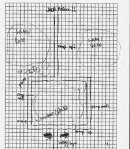
These are some of the hand drawn maps I did for the game. One of them is from early in the semester and the other four are from the final level design that we are building in Unity. You’ll notice that I’ve marked areas where the level ramps up, see hash marks for log and coin obstacles and collectibles, areas where there are caves and notes that mention areas where a specific animal should be used. Also, if you put the four maps together, one could draw what they think is an ideal path to get the fastest score possible. What was great about this process is that I could draw out maps, show them to the engineers for feedback and change them as needed. Sometimes when inserting the maps into Unity, the engineers found that sometimes the map wasn’t possible so we adjusted them as needed. This has been an extremely useful process. Very low tech, but invaluable for the engineering team to get the level into the game. 🙂
These maps are relevant and important – I developed them because we found building the level from scratch in Unity was NOT efficient. Instead, it was easier for the engineers to have me draw out the maps and we could discuss them afterwards for feedback. At times, parts of the level I had drawn would not work within the game’s engine, so the engineers would then modify it in game to fit as close as possible to the original vision. This iterative process was helpful in playtesting and also much more efficient than our previous attempts at level design.
Another valuable lesson from these hand drawn maps were that we could discuss what types of environments we could implement on these maps. Would they be valleys, grasslands, lakes, mountains, etc? We were able to create visual dynamics for the player as they journey through the level by this approach. I went through a lot of graph paper in creating these maps, and honestly, this was the best way to build the levels. The programmers and I could look at the maps together and plan out our approach in Unity rather than going into it haphazard. Since Unity has decent environment building tools, we will build the track into Unity and build the environment around it. We can also color the environment through Unity as well, so we can create snowy mountain areas and such. All very helpful as we push through this crunch time into the EAE Open House on December 7th.
-
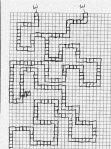
- A map from when we were thinking about level designs. Note that there are no forking paths.
-
- Yet another portion of the EAE Day level
-

- A portion of the level for EAE Open House
-
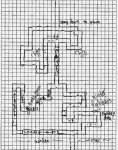
- Another part of the level for our EAE open house
-

- Modular hand drawn map for inputting into Unity
We submitted the game to IGF (Independent Game Festival) on October 31st. Attached to this post is the launch trailer and a screenshot of the game. It’s been a long road getting to this milestone, and there is plenty left to polish, but it definitely felt good submitting it to the festival! 
This moment is significant because it represents so far all the work that me and my team have accomplished. Though the game has changed in many forms since its conception, we’ve created a fun rails game that utilizes Kinect, is in line with our art theme, and is fun to play. Creating the game design has been invaluable experience for me, both in terms of gameplay and level considerations. I would say that we nailed down the Kinect movement mostly last semester and that this semester found me thinking about level design, obstacle and collectible placement. I had a lot of help from Anurag originally in regards to placement, but when we created the new area and track, I did the all the design of the level and obstacle/collectible placement.
We still have a lot of work to do towards EAE day – while this build represents a lot of the work that we have done, there is much more to be created:
Zodiac Trailer:
Areas of Focus Post-IGF
- Remastered level: Our level will feature elevations for EAE Open House. Currently, the playing field in this level is very flat. By adding elevations to the game we will be able to create new areas (valleys and mountains), which gives the player more rewards for traversing throughout the level. It’s a cheap way to add dynamics to the level. However, the challenge is that the engineers must build a track and tweak Anurag’s track tweener so that the animals movement on those elevated planes are smooth and not break the game. It creates a dependency, but I think it will be worth it when we finally achieve the result.
- We will be brightening up the color pallette- our game looks like it was constructed with dark construction paper, so we need to turn up the color value in a majority of our game’s assets right now. The characters need to be brighter, the landscape less dark, and it needs to be populated with more than just dark trees. The artists are aware of this and will be creating flowers and lighter textures for the animals and environments.
- I will be designing new maps that feature new gameplay areas – there will be mountains, valleys, and cliff areas. As mentioned, this will look nicer for the player. Also, it gives me more intent and purpose in designing these areas. Won’t it be nice for the player to ascend out of a canyon area into a beautiful grassland and then ascend into a snowy mountainous region? It gives the game more scale and adds to the magic of the Zodiac Race. Also, these hand-drawn maps serve as a good tool for the engineers to quickly place the track and also offer feedback when certain turns may create an issue for the player.
 Josh Lee