I have finally begun to dabble within Unity in a more hands on sense as our track’s have been placed out by the engineers based on my map designs. Since many of Unity’s controls are similar to Maya, it’s easy to manipulate level objects as needed and place obstacles and collectibles. Playtesting is essential and something that we need more of as we go along. The level works when being controlled via the keyboard controls but when it comes to actually using the Kinect the game gets pretty hard. We need more space between obstacles and collectibles so that players can efficiently dodge obstacles whether that’s through jumping or lateral movement. Soon enough we’ll have it submitted to IGF. Can’t wait to hit this milestone!
 Below are some sneak peek photos. Actually, not really. I just wanted to highlight some of the tools and way that Unity works similarly to Maya. You’ll see that I’ve got a coin collectible highlighted, and it is currently in the movement tool. What I like about Unity and Maya is that they have similar controls. The movement tools allow you to manipulate the objects position on the map, the scale tool allows you to make them large or small, and the rotation tool, drum roll… allows you to rotate them. These are all very simple observations, but here is the point: The use of these tools give me more skills with which to produce and design games.
What’s great is that I’m getting to the point where I can create assets for ingame use, place them within the engine, and see how they look. Texturing is still a large challenge for me, but eventually I’ll get to the point where I can get these assets in game. It’s great to see how certain programs build upon each other. Maya allows me to create the art assets, but it seems to have set a standard so that I can create and manipulate environments easily in Unity. The next challenge is learning to program, but honestly, I think my efforts should be spent more on thinking about design and polishing my art skills in Maya.
 Another fun thing that I’ve been using within Unity are pre-fabs. These are tools where you cancreate a set of assets that you can populate easily throughout the level. This eliminates tedious copying and pasting of placing every single coin on the track. However, this does come with its drawbacks as well- these prefabs can be inflexible. However, they save me from the work of copying and pasting every coin. What I’ve been doing is placing a prefab down and then editing by adding or subtracting coins. We also have a zig zag coins prefabricated as well and it plays nicely through keyboard controls. However, when playing with Kinect, these are placed too close together when physically moving from side to side. I can stretch out their spacing by adjusting the prefab, but it’s not always optimal. Many a time I have had to go in and still tweak each asset one by one. So hypothetically, the prefabs make for less work, but I find that I still need to retouch most of them when placed so that the experience is better for the player.
Another thing I can help with recently is by doing quality assurance for the art. Kevin has had me take all of the assets that have been submitted into Unity and make sure that there aren’t duplicate faces, useless faces (ie, faces that we’ll never see in the game – like the bottom of the tree trunks -so they can be deleted to save on polys), and also that there is a standard nomenclature for the assets that we’re using. This helps the artists so that they can work on other assets and also helps me practice the skills I’ve been learning in Maya.
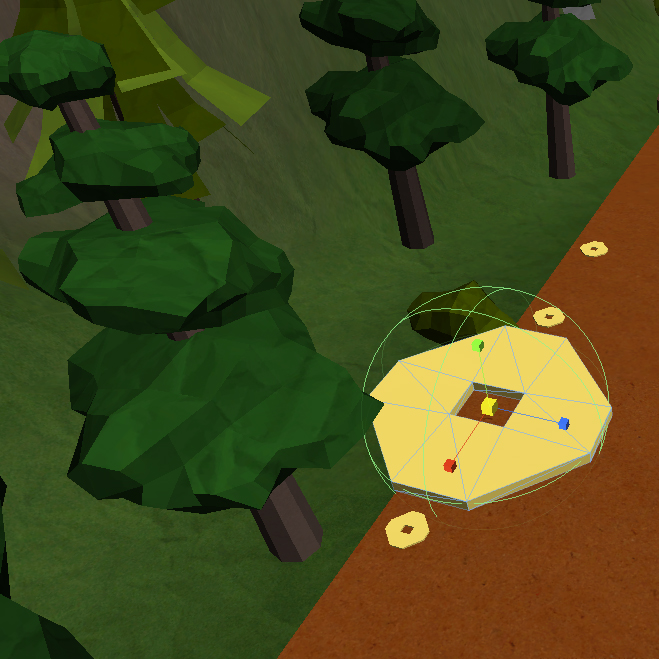
Whoa! Whoa! Whoa! What happened to that coin?

 Josh Lee